Extending A/D Schema
For Microsoft Active Directory deployments, if the info attribute is used (e.g. when Exchange is also deployed in the environment), it is required to extend the A/D schema in order to create a new attribute assigned to hold password change fail messages from the Enforcer, to be displayed as notifications on the user workstations.
This section assumes that verbose user notification is planned for the target domain.
In order to define and use a unique Active Directory attribute exclusively for the EPAS Enforcer, the Active Directory schema can be extended by performing the actions detailed below.
This procedure uses only Microsoft Windows native tools and methods, as documented by Microsoft, and has to be performed once for each domain. The Schema Master server must be running Windows 2003 or later.
- Install the Schema snap-in by clicking Start, Run, and entering
regsvr32 schmmgmt.dll. A pop-up window will confirm the operation. - Open the Microsoft Management Console by clicking Start, Run, and entering
mmc.exe. - Go to File -> Add/Remove Snap-in -> click Add -> Select Active Directory Schema and click Add
- Click once on Active Directory Schema, then right-click on Active Directory Schema and click Connect to Schema Operations Master
- Expand the Active Directory schema and right-click Attributes, then click Create Attribute. Create New Attribute window will appear.
- Enter the following data, as also shown in the included picture:
Common Name:            epasEnforcerMsg
LDAP Display Name:      epasEnforcerMsg
Unique X500 Object ID:  1.3.6.1.4.1.49884.1.1.1
Description:            Password change failure reasons
Syntax:                 Unicode String
Minimum:                1
Maximum:                1024
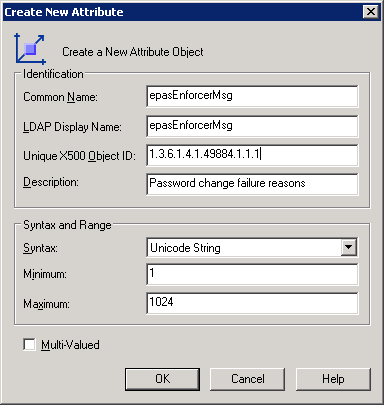
- Once the attribute is created, select Classes, expand Classes and select user. Right-click user, select Properties, then select the Attributes tab.
- Click Add, select the
epasEnforcerMsgattribute, then click OK.
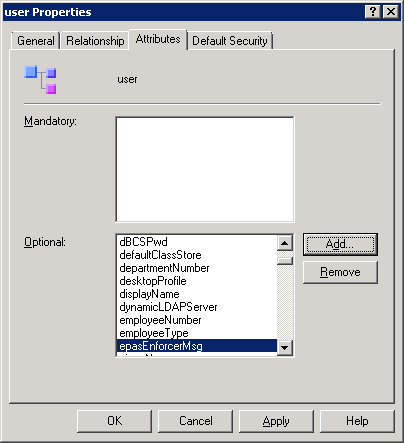
- The
epasEnforcerMsgattribute can now be used when configuring the EPAS Enforcer components instead of the defaultinfoattribute.