Audit Profiles
Audit profiles are a collection of parameters passed to the auditing process. The audit profile defines what actions are taken to recover the accounts' passwords, during the auditing process. An audit profile is composed of steps, each step defining the tasks to be performed during the password recovery process.
Generic Audit Profile Settings
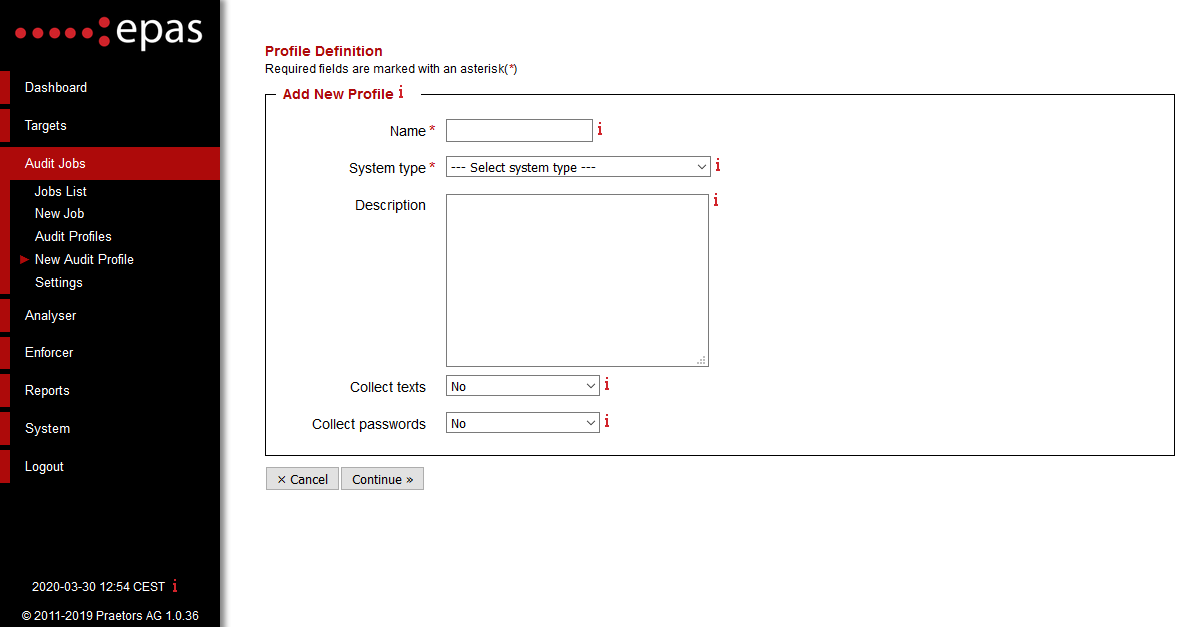
In the first step, under Audit Jobs → New Audit Profile the following changes are required:
- Enter the name of the audit profile and a general description of the profile. The optional general description parameter can be used to detail the audit profile, target type audited, time schedule or any other non-technical data which can help in identifying the audit profile.
- Select a system type - the value selects which system types the audit profile will be used for.
- Select whether to Collect texts (full names, addresses, telephone numbers) will be collected during audit jobs - this information is stored on the encrypted storage of the EPAS Master and is not accessible by EPAS Administrators or any other users. It is recommended to collect text information in order to allow future audit jobs to use this data in order to recover passwords on other systems.
- Select whether to Collect passwords (recovered account passwords) will be collected during audit jobs - this information is stored on the encrypted storage of the EPAS Master and is not accessible by EPAS Administrators or any other users. It is recommended to collect password information in order to allow future audit jobs for systems which have a smaller password recovery rate (RACF, Oracle, MSSQL).
The next step consists of selecting the profile modes, and, for targets that have multiple types of passwords, which passwords to audit. EPAS has six profiles modes, each profile mode representing the attack type that is tried to recover account passwords. The profile modes available are:
- Compromised
- Preliminary
- LM Hashes Source (only available for Microsoft Windows targets and AS/400).
- Dictionary
- Brute Force
- Artificial Intelligence
Note
For LDAP directory profiles, in case the target is a NetIQ eDirectory server (with Universal Passwords enabled), the profile definition configuration requires to select at least one password type (e.g. LDAP MD5), disabling the Ignore Empty Passwords function, and configuring at least one profile mode (e.g. Preliminary).
-
[ ] The next step consists in configuring the compromised mode auditing step - if it is enabled:
-
Select a time limit for the current step. By default, the compromised mode should be allocated 10% of the total time for a job. For auditing salted hashes, it is recommended to set a duration of at least 1 hour, up to 4 hours.
The next step consists in configuring the preliminary mode auditing step - if it is enabled:
- Select a time limit for the current step. By default, the preliminary mode should be allocated 10% of the total time for a job.
- Select whether to use the initial passwords list, account information or information collected from other audits that have the collect texts/passwords flag enabled.
- Depending on the type of audit, enable rules and / or hybrid mode.
- Derivation rules perform transformations on each password candidate, trying the most probable transformations that humans use to alter their passwords (e.g.
P4$$w0rdinstead ofPassword). The most commonly used rule sets are the MEDIUM and LARGE rule sets, depending on the audited system type. - Hybrid mode prepends and / or appends a number of characters at the beginning or at the end of a word from the lists selected above (initial passwords, account information, collected texts and collected passwords). The hybrid mode will try all possible combinations of the words present and characters from the selected character set.
- Select whether to enable the Fast Brute Force mode, which will try and generate all the possible combinations of characters from the selected character sets. The average maximum length of the Fast Brute Force mode is 4 to 5 characters, which will reveal the weakest passwords within a target system - short passwords.
The next step consists of configuring the LM hashes source mode, which takes advantage of any LAN Manager hashes found on the target system, to recover the account password:
- Select a time limit for the current step. No other parameters are required for the LM hashes source step. Selecting a time limit under 2 hours will include letters and numbers and will likely be completed in minutes. Selecting a time limit between 2 and 5 hours will include letters, numbers and ASCII special characters whenever trying to recover account passwords. For more information on the time limits, consult the tooltips present in the audit profile definition wizard.
The dictionary step consists of selecting the following parameters:
- Select a time limit for the current step. Please allocate 40%-45% of the total time of an audit job to this step for good performance.
- Select whether a dictionary will be used or a dictionary list (a collection of dictionaries).
- Select the dictionary or the dictionary list. The vendor has provided, during the training, several dictionary lists which are compatible with each region where the EPAS Master is deployed.
- Depending on the type of audit, enable rules and / or hybrid mode.
- Derivation rules perform transformations on each password candidate, trying the most probable transformations that humans use to alter their passwords (
P4$$w0rdinstead ofPassword). The most commonly used rule sets are the MEDIUM and LARGE rule sets, depending on the type of system audited. - Hybrid mode prepends and / or appends characters at the beginning or at the end of a word from the selected dictionary / dictionary list. The hybrid mode will try all possible combinations of the words present and characters from the selected character set.
The brute force step consists of selecting the following parameters:
- Select a time limit for the current step. Please allocate 40%-45% of the total time of an audit job to this step for good performance.
- Select a minimum length from where to start the brute force process. If Fast Brute Force was selected in the preliminary mode configuration step, the value of the current parameter should be the above the value selected in the Fast Brute Force mode.
- Select a maximum length for the brute force step. If the allocated time limit is sufficient, the auditing process will exhaust the entire key space (all the possible combinations). If this is not the case, the brute force process will try the most probable combinations of characters.
- Select one or more character sets to be used in the brute force process.
- As of EPAS version 1.0.34, brute force masks have been implemented, as an alternative to the legacy incremental mode for the brute-force step. To select a brute-force mask configuration, use the Mode parameter and then select the Masks configuration from the list.
The artificial intelligence step consists of selecting the following parameters:
- Select a time limit for the current step.
- Select a rule set for derivating words generated by the password model. For standard duration jobs, it is recommended to use a large rule set, such as
G30_L_400K. - Select at least one of the Static model or Dynamic model options. The static model is provided as part of every EPAS installation and is trained on significant real-world passwords. The dynamic model is generated and built per EPAS MASTER and leverages previously recovered passwords in the environment.
- Depending on the type of target, choose a the model output size. It is recommended to use a large size output for non-salted systems such as Active Directory, or smaller (Tiny, Small or Medium) sizes for salted systems, depending on the average speed of the password hashing algorithm.
File Upload or Custom Application Profiles
For auditing custom applications with extended password hashes which are not supported as standalone targets in EPAS, a custom profile needs to be defined. The profile configuration for all extended hash types is identical, for both file upload and custom database application target systems.
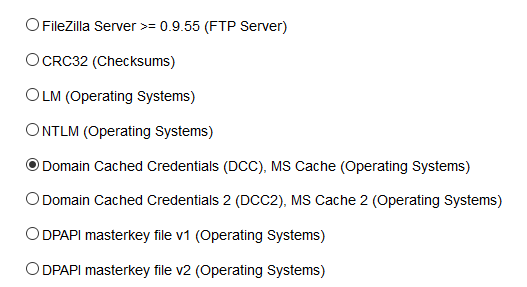
Whenever defining an audit profile corresponding to the above targets, in the second step of the profile definition process - the Algorithm Specification step - select the hash type corresponding to the audited profiles (e.g. Domain Cached Credentials (DCC), MS Cache).
After selecting the password hashing algorithm, continue to the next steps, as detailed in the Generic Audit Profile Settings section.