Policies
This section covers the policy creation and definition process. Policies, in the EPAS Enforcer product, are composed of one or more policy rules, each rule defining a required behaviour whenever users are changing passwords.
The Enforcer policies extend the standard system password policies (for example, Active Directory), which have proven to be ineffective against real-world password threats. The additional rules allow the password policy to force password strength measurement, and also block dictionary words, keyboard patterns or repeated characters.
To create a policy, navigate to the Enforcer » Policies section and use the New Policy button.
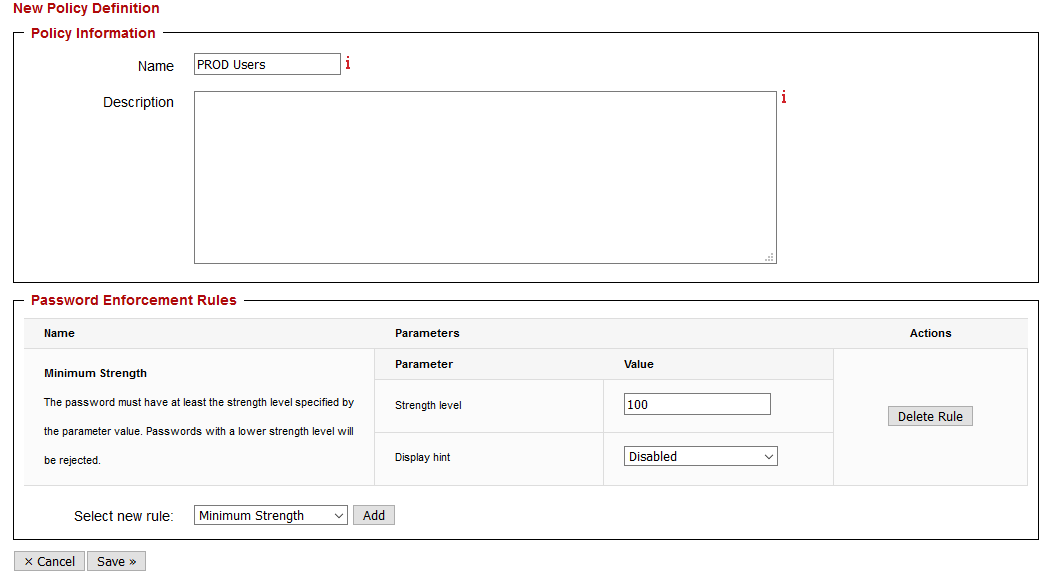
Each policy requires the following parameters:
| Parameter | Description |
|---|---|
| Name | The name of the password policy. This name is used in the policy mapping process, whenever assigning the policy to one or more user groups or organizational units. It is recommended to use naming conventions to differentiate between productive policies, and staging/test ones. |
| Description | Optional description field |
| Password Enforcement Rules | Section which contains one or more password policy rules, to be checked for in this policy. All the rules in a policy will be checked, regardless of whether one of them failed. The number of rules in a policy is not restricted, however, for ease of use, it is recommended to use approximately 3-5 rules per policy (e.g. strength, dictionary, initial, sequences and uniqueness). |
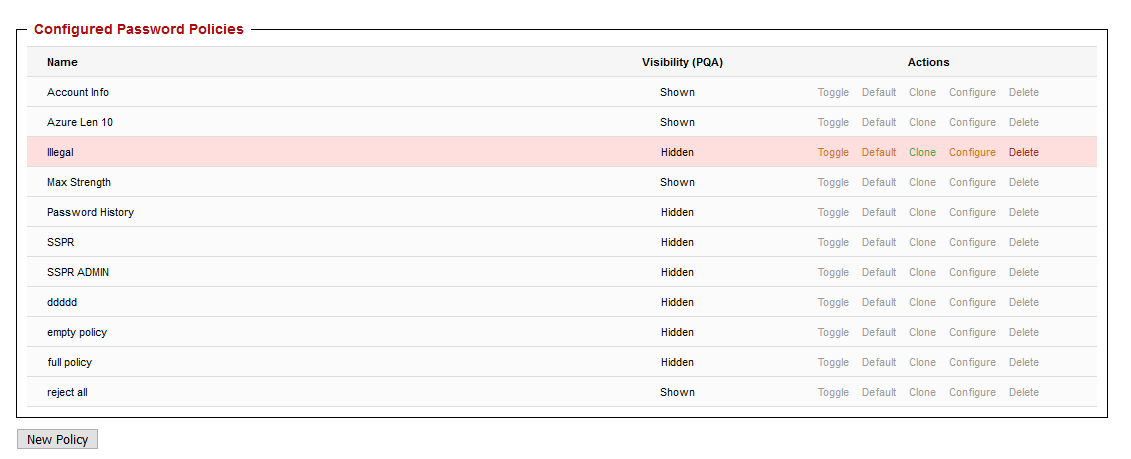
Once the parameters have been defined, use the Save action to save the policy. Three actions are available for already defined policies:
- Toggle: can be used to toggle the visibility of the password policy in the public password checking (PQA) interface.
- Default: can be used to set the selected policy as a default for the public password checking (PQA) interface.
- Clone: can be used to clone a password policy, resulting in a policy object with the same parametrization. This operation is useful for staging purposes.
- Configure: can be used to edit (add or remove) password enforcement rules.
- Delete: can be used to remove the policy objects. If the policy object is in use, a confirmation screen will also show the links to other objects (policy mappings or server groups).
For information on how policy elements are applied to one or more user groups or organizational units, refer to section Policy Assignment
Tip
For already enrolled systems, editing a policy (adding or removing rules) is immediate, and is applied on the next password change, for any server groups or policy mappings where the policy is used.
Password enforcement rules
The table below represents all the present policy rules, which can be added once or multiple times to any given Enforcer policy object. For each rule, when applicable, the available parameters are listed and explained.
| Rule name | Description | Parameters |
|---|---|---|
| Minimum Strength | The password must have at least the strength level specified by the parameter value. Passwords with a lower strength level will be rejected. | Strength level -- any password with a strength level lower than the specified parameter will be rejected. Display hint -- whether to display a hint on using a passphrase on a failed password change. |
| A/D Complexity Req. | The password must meet the criteria defined by the Microsoft Active Directory group policy for complexity requirements (GPO setting: Password must meet complexity requirements). For fine tuning this requirement and better end-user notifications, use granular controls / rules and not this rule. | NONE |
| Password History | The password must be different from the passwords previously used by the same user. The number of previous passwords to verify against is specified by the parameter value. | Password history -- a value of 1 will not allow users to use their current password as the next password. Incrementing the parameter will reject any passwords which have been present in the last specified changes. |
| Password Unique 3 | The password must be unique, i.e. not user by other user(s). The verification scope is specified by the parameter value: either the server group the user account belongs to, or all defined server groups (the entire organization). | Scope -- look for password reuse in the current server group or in the entire organization. |
| Password Length | The password length must be within the interval defined by the minimum and maximum parameters. Passwords shorter or longer than the values specified will be rejected. | Minimum length -- any passwords shorter than the parameter will be rejected. Maximum length -- any passwords longer than the parameter will be rejected. |
| Account Information #1 | The password must not be found in the known account information (user name, full name, description, A/D path, A/D CN). This rule is case-insensitive. | NONE |
| Account Information #2 | The password must not contain any word of length |
Case sensitive -- when set to false, will perform case insensitive matches. Token size -- all words from the account information of equal or higher length will be checked. |
| Account Information #3 | The password must not contain any word of length three or more, which is found in the user name or full name. This rule is case-insensitive and compatible with the Microsoft GPO requirements tokenizer. | NONE |
| Initial Passwords #1 1 | The password must not be found in the initial passwords list. This rule can be case sensitive or insensitive depending on the case sensitive parameter value. | Case sensitive -- when set to false, will perform case insensitive matches. Any password which is identical to a word in the initial password list will be rejected. |
| Initial Passwords #2 1 | The password must not contain any word of length |
Case sensitive -- when set to false, will perform case insensitive matches. Token size -- all words from the initial passwords list of equal or higher length will be checked. |
| Compromised Rule | The password must not be found in the compromised passwords lists. This rule is case sensitive. | Any password which is present in the compromised passwords lists will be rejected. |
| Dictionary Match #1 2 | The password must not be found in the dictionary specified by the dictionary parameter value. This rule can be case sensitive or insensitive depending on the case sensitive parameter value. | Case sensitive -- when set to false, will perform case insensitive matches. Dictionary -- the dictionary which will be used in the verification. Any password which is identical to a word in the dictionary will be rejected. |
| Dictionary Match #2 2 | The password must not contain any word of length |
Case sensitive -- when set to false, will perform case insensitive matches. Dictionary -- the dictionary which will be used in the verification. Any password which is identical to a word in the dictionary will be rejected. Token size -- all words from the dictionary of equal or higher length will be checked. |
| Dictionary Match #3 2 | The password must not contain any word of length |
Case sensitive -- when set to false, will perform case insensitive matches. Dictionary -- the dictionary which will be used in the verification. Any password which is identical to a word in the dictionary will be rejected. Token size -- all words from the dictionary of equal or higher length will be checked. Apply up to length -- Any password exceeding this length will not be checked against dictionary matches (e.g. for passphrases). |
| Character Groups | The password must contain characters from at least the number of groups specified by the parameter. There are five character groups defined: uppercase letters, lowercase letters, digits, special characters and others (which contains any characters not matched by another group). | Minimum character groups -- the minimum number of character types that should be present in a password in order for it to be accepted. |
| Repeated Characters | The password must not contain the same character repeated consecutively more than the number of times specified by the parameter value. | Maximum repeated characters -- the maximum allowed number of repeated characters (aaa, 333, ZzZ). |
| Sequenced Characters #1 | The password must not contain predictable sequences of characters, such as consecutive digits or common keyboard patterns. The maximum number of consecutive characters allowed is defined by the parameter value. The sequences are matched in normal and reverse order. | Maximum sequenced characters -- the maximum allowed number of sequenced characters (e.g. azerty, qwerty, qwertz, 1234567). |
| Sequenced Characters #2 | The password must not contain a single, predictable sequence of characters, such as consecutive digits or common keyboard patterns. The maximum number of consecutive characters allowed is defined by the parameter value. The sequence is matched in normal and reverse order. | Maximum sequenced characters -- the maximum allowed number of sequenced characters. Character subset -- a selection of one of the desired sequenced character sets(e.g. azerty, qwerty, qwertz, numbers, specials). |
| Ordered Characters | The password must not contain characters in alphabetical order, such as abc, MNO, etc., either ascending or descending. The maximum number of consecutive ordered characters allowed is defined by the parameter value. |
Maximum ordered characters -- the maximum allowed number of ordered characters (e.g. abc, MnO, XYZ). |
| Minimum Letters | The password must contain at least the number of letters specified by the parameter value. | Minimum letters -- minimum required letters. |
| Minimum Uppercase | The password must contain at least the number of uppercase letters specified by the parameter value. | Minimum uppercase -- minimum required uppercase characters. |
| Minimum Lowercase | The password must contain at least the number of lowercase letters specified by the parameter value. | Minimum lowercase -- minimum required lowercase characters. |
| Minimum Digits | The password must contain at least the number of digits specified by the parameter value. | Minimum digits -- minimum required digits. |
| Minimum Special | The password must contain at least the number of special characters specified by the parameter value. | Minimum special -- minimum required special characters. |
| Digit Position | The password must not contain a digit (0-9) at the beginning or the end, as specified by the parameter value. | Digit position -- the password should not have a digit at the start, end or both sides. |
| Illegal Characters | The password must not contain forbidden characters. The forbidden characters list is defined by the parameter value. The characters are matched case-sensitive. | Forbidden characters -- a list of printable characters which are disallowed. |
Example enforcement policies
This subsection contains recommendations for standard deployments, using combinations of the rules presented above. It is assumed that the provisioned Enforcer systems also use the Active Directory password policy, therefore some rules have been omitted.
The policy for standard users (regular users, non-IT personnel):
| Rule name | Parameters |
|---|---|
| Password Strength | Strength level: 40Display hint: false |
| Initial Passwords #1 1 | Case sensitive: false |
| Dictionary Match #2 2 | Case sensitive: falseDictionary: EnglishToken size: 5 |
The policy for privileged accounts (administrators, sensitive business accounts):
| Rule name | Parameters |
|---|---|
| Password Strength | Strength level: 100Display hint: false |
| Initial Passwords #1 1 | Case sensitive: false |
| Dictionary Match #2 2 | Case sensitive: falseDictionary: EnglishToken size: 5 |
-
The initial password list can be inspected and modified in the Audit Jobs » Settings » Initial passwords page. The changes are applied immediately. ↩↩↩↩
-
The dictionaries must first be imported as described in the Dictionaries section. ↩↩↩↩↩
-
The default message for password unique notifications might provide too much information about why the password is rejected, as it will notify the end-user the same password is used somewhere else in the environment. To prevent this, use the message translation feature as described in the Languages section, and set the message for the password unique rule to be identical to the one in the compromised rule. ↩