Servers
Info
The actions or operations described in this section are performed once, for each distinct server (e.g. domain controller).
Each server group object includes a collection of multiple servers. Each server corresponds to one single system handling password change requests. For Active Directory, this identifies with a single domain controller.
Warning
As Enforcer makes use of password filter DLLs to make sure password changes are checked for policy compliance, it is mandatory that all domain controllers which handle password changes are enrolled into the Enforcer as servers.
Any domain controller (or equivalent) not enrolled in Enforcer will be able to change passwords without being compliant to Enforcer policies.
Server configuration
Info
All the configuration performed whenever adding or editing an Unprovisioned server has no effects on the domain controllers or servers that are being configured. Active configuration changes or any actions on the domain controllers / servers is performed only during provisioning, or after provisioning the server.
It is therefore recommended to perform all initial configuration of the server(s) before the provisioning process, in order to avoid active configuration changes on the target domain controllers or servers.
For each domain controller, it is required to use the New Server button in the Enforcer » Server Groups » Servers page.
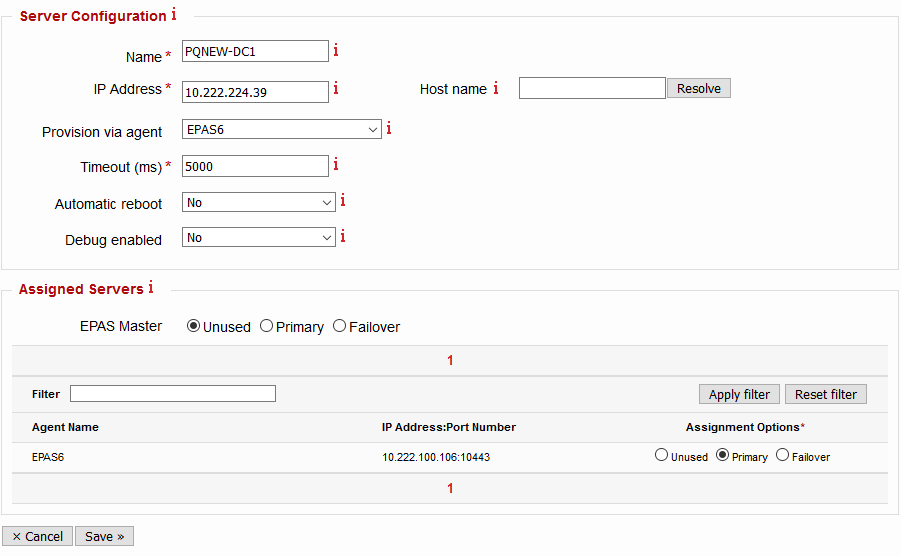
In case editing an already provisioned server, the configuration change(s) take place at the next password change on the system (dynamic). The parameters for the server configuration are represented in the table below.
| Parameter | Description | Default |
|---|---|---|
| Name | Enter the name of the server being added or edited. It is recommended to use the server name. |
|
| IP Address | Enter the IP address of the server being added or edited. If DNS support is present in EPAS, it is also possible to use the Host name field and then pressing the Resolve button to translate it to an IP address. |
|
| Provision via agent | Defines the EPAS system which performs the provisioning process, when the operation is initiated. AGENTs can also be used for provisioning, as long as the rules marked as For provisioning in the Network Requirements exist. | None (EPAS MASTER performs the provisioning) |
| Timeout | In case password change requests do not reach the EPAS components (AGENT, MASTER): The timeout in miliseconds (ms) after which the Enforcer password filter attempts to connect to the next defined EPAS AGENT or MASTER defined in the Assigned Servers section. It is recommended to use a value between 2000 and 5000 ms, depending on the peering between EPAS MASTER or EPAS AGENTS and the defined server. |
5000 |
| Automatic reboot | Defines whether the provisioning process should perform an automatic reboot of the system after a succesful provisioning or deprovisioning action. It is recommended to enable this flag in development, test and acceptance scenarios. For productive system(s), use Yes and manually perform a reboot of the system after provisioning or deprovisioning. |
No |
| Debug enabled | Defines whether additional debug information is logged on the provisioned system, in the Event Log. Use this parameter only in development, test and acceptance scenarios, or whenever debugging the password filter components. |
No |
Whenever a password change request happens on the provisioned server, it forwards the password change to any of the EPAS components defined for this particular system. Multiple EPAS components can be used for the purpose of load balancing, high availability and failover. The follow table describes the states present in the Assigned Servers section of the server configuration screen.
| State | Description | Purpose |
|---|---|---|
| Unused | The EPAS component is not in use for Enforcer functionality, on the configured server (domain controller). | None |
| Primary | The EPAS component is actively in use for Enforcer functionality, on the configured server (domain controller). Any systems in this group are also load balanced using a round robin algorithm, in order to distribute password change requests. For productive environments, it is recommended to have at least two EPAS components (MASTER, AGENT) in this state, for each defined server. |
High Availability and Load Balancing |
| Failover | The EPAS component is in use for Enforcer functionality, only when no other components are reachable from the Primary group. Use this state for the EPAS MASTER, when possible, or for any EPAS AGENTS that are located in too remote network segments (high latency). |
Failover/fallback |
Once the settings are saved, the system should appear in the Servers page, with the status of Unprovisioned. Any edits performed on the Unprovisioned servers have no effect on the systems. Any edits performed on the Provisioned servers take effect on the next password change.

Provisioning
The provisioning action is used once per server (e.g. domain controller), and performs the following actions:
- Connects to the server using the credentials specified in the Server Groups configuration page.
- Validates that the server is a valid domain controller (or any other supported system).
- Transfers the password filter DLLs to the target domain controller.
- Generates an RSA 2048 bit private key which is then used to sign a Certificate Signing Request.
- Transfers the Certificate Signing Request to the EPAS MASTER, which creates a certificate for mutual authentication.
- Ensures the certificate is present on the domain controller, and the domain controller is able to validate the EPAS Enforcer certificate.
- Ensures the proper ACLs are set-up for the notification attribute.
- Loads the password filter DLL after the next reboot.
- (Optional) Performs a server (domain controller) reboot, depending on the parametrization.
To provision a server, use the Provision action in the Servers page. The provisioning window displays log data about the state of the provisioning process, and whether provisioning has succeeded. Below is an example provisioning log:
Info: Fri May 31 21:33:55 EST 2019
Info: Checking agent 10.222.100.106, port 22 ...
Info: Synchronizing certificate data ...
Info: Running the retrieval operation on the agent ...
Info: Using a domain account, for domain PQNEW ...
Info: The temporary share is ADMIN$ ...
Info: Connecting to server 10.222.224.39 with username PQNEW/octav_ops1 ...
Info: Using TCP port 445 with fallback to TCP port 139 ...
Info: Authentication successful
Info: Calling WMI, using RPC on TCP port 135 ...
Info: WMI/EXEC connecting to server allocated dynamic RPC TCP port: 49154 ...
Info: Product type is Windows Domain Controller
Info: The system volume is "c:\" and the Windows directory is "windows"
Info: The root domain DN is "DC=pqnew,DC=local"
Info: The forest configuration NC is "CN=Configuration,DC=pqnew,DC=local"
Info: The Active Directory database volume is "c:\" and the database directory is "windows\ntds"
Info: The target ID is EPAS-PQCLI-49D999E3B2C62D571E64F141634801AB
Info: Installing EPAS filter...
Info: Completing enrollment...
Info: Domain root and AdminSDHolder ACLs already have the EPAS filter ACEs...
Info: Complete, reboot the target computer manually.
Warning: Wait until the server has rebooted before using the EPAS filter!
Info: Retrieving processed data from the agent ...
Info: Synchronizing certificate data ...
Info: Operation completed successfully

The provisioning has PASSED.
Tip
It is recommended to set the Automatic reboot parameter to No and provision all the servers (domain controllers) one after the other, after they are all added to the Servers list.
Once all provisioning processes have ended with a PASSED status, perform manual rolling restarts of the domain controllers, in order to active the Enforcer password filter DLL on all the systems.
This methodology allows Enforcer provisioning the systems, without loading (and therefore activating) the password filter DLLs, which allows EPAS operators and / or IT operations to troubleshoot any provisioning issues (if any).
Deprovisioning
The deprovisioning operation performs all the necessary steps in order to uninstall the Enforcer password filter from a server (domain controller). At the end of the deprovisioning process, the password filter DLL is deleted, any configuration is unloaded, and certificates removed. It is strongly recommended to reboot the target domain controller after a succesful deprovisioning, in order to unload the password filter DLL.
Use the deprovisioning procedure in the following scenarios:
- uninstalling EPAS Enforcer from a domain
- before domain controllers are phased out of use (e.g. decomissioned)
- when domain controllers are demoted to standard Windows workstations or servers
- if the notification attribute needs to be changed after Enforcer has already been deployed (not recommended, not supported by vendor)
To deprovision a server, use the Deprovision action in the Servers page. The deprovisioning window displays log data about the state of the deprovisioning process, and whether deprovisioning has succeeded. Below is an example log:
Info: Fri May 31 19:56:00 EST 2019
Info: Checking agent 10.222.100.106, port 22 ...
Info: Synchronizing certificate data ...
Info: Running the retrieval operation on the agent ...
Info: Using a domain account, for domain PQNEW ...
Info: The temporary share is ADMIN$ ...
Info: Connecting to server 10.222.224.39 with username PQNEW/octav_ops1 ...
Info: Using TCP port 445 with fallback to TCP port 139 ...
Info: Authentication successful
Info: Calling WMI, using RPC on TCP port 135 ...
Info: WMI/EXEC connecting to server allocated dynamic RPC TCP port: 49154 ...
Info: Product type is Windows Domain Controller
Info: The system volume is "c:\" and the Windows directory is "windows"
Info: The root domain DN is "DC=pqnew,DC=local"
Info: The forest configuration NC is "CN=Configuration,DC=pqnew,DC=local"
Info: The Active Directory database volume is "c:\" and the database directory is "windows\ntds"
Info: Uninstalling EPAS filter...
Info: Complete, reboot the target computer manually.
Warning: Wait until the server has rebooted before using the EPAS filter!
Info: Retrieving processed data from the agent ...
Info: Synchronizing certificate data ...
Info: Operation completed successfully

The deprovisioning has PASSED.
Redeployment
The Redeploy operation allows an operator the push the latest changes to the configuration of the Server Group, Server or Enforcer AGENT/MASTER assignment to an already deployed Enforcer system. In addition, the password filter DLL is updated (in case a newer version exists). This operation is useful for:
- Pushing a new password filter DLL version to the server.
- A reconfiguration of Enforcer or, specifically, the server definition (e.g. migrating AGENT systems to new IP addresses, unavailability of all AGENT systems) is required.
- Reloading the Server Group/Server configuration (Default Policy, Debug, Timeout, etc.) without a password change.
Info
If upgrading the password filter DLL using the Redeploy action, a reboot of the target system is required for the new version to be loaded.
To redeploy a server, use the Redeploy action in the Servers page. The window displays log data about the state of the redeployment process, and whether redeployment has succeeded.