Upload Manager
As of EPAS version 1.0.38, an upload manager component is present to allow the upload and application of several types of packages:
- EPAS Updates: packages such as software updates, hot-fixes and firmware.
- EPAS Dictionaries: compromised password lists provided as regular EPAS updates.
- EPAS (Remote) Restore Points: packages created by the Online Backup operations.
The functionality can be accessed within the System » Maintenance » Upload Manager page in the EPAS MASTER web console.
The Upload Manager facility allows uploads of large files, limited only by the amount of disk space on the EPAS MASTER system. The uploads are also resumable, in chunks of 100MB, in case the network connection of the EPAS administrator performing the upload fails.
Warning
EPAS version 1.0.38 requires the presence of a backup disk in the EPAS appliance. Given the lack of a backup disk (to be used as update file storage), it is not possible to upload any of the packages mentioned above.
The following sub-sections describe the different type of upload packages, and how they are handled by the Upload Manager facility.
EPAS Updates
Use this package type for updating the EPAS software as directed by Detack GmbH. The update function will not cause any data loss, but a backup operation is nevertheless recommended before updating EPAS. This package type is fully encrypted towards the EPAS MASTER (unique) system key, and its integrity protected by cryptographic signatures.
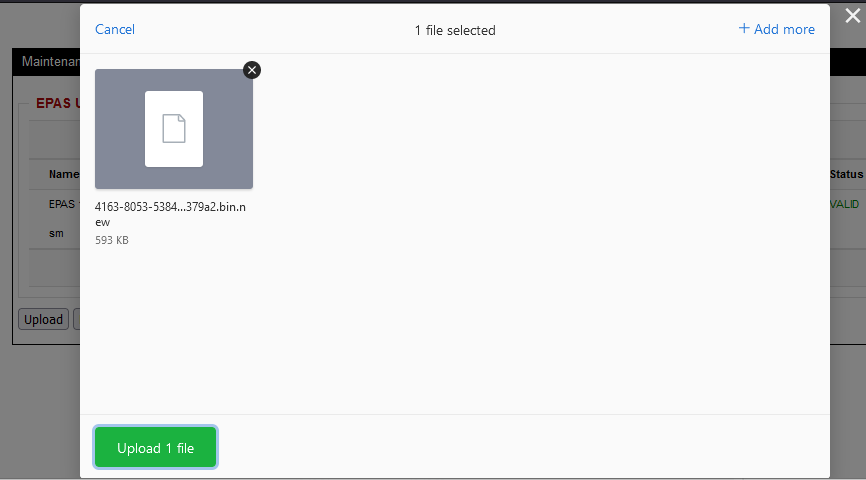
- Click the Upload button on the Upload Manager page.
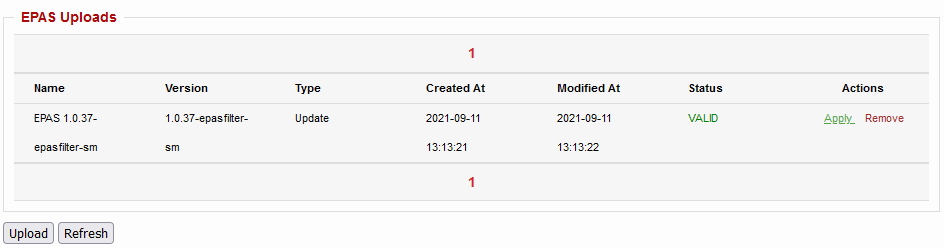
- Once the upload finishes, the update file will be present in the upload table, with the name, type and other metadata present.
- Once the upload finishes, use the Apply operation to start the update operation. For EPAS version upgrades, the EPAS administrator will be redirected to a service console to monitor the status of the update.
Note
During the update operation, the EPAS system might not be available and audit jobs might not be executed. The update function can be called only when no jobs are in the running or queued phases and no data retrieval is performed. The update operation is expected to take up to one hour.
Only the MASTER units need the updates, they will automatically update the WORKER and AGENT systems as needed, if these modules are present. The WORKER systems are updated automatically within a few minutes after the MASTER, while the AGENT systems are updated when they are used; to force the update on an AGENT, click the Test action in the EPAS Systems area (System → EPAS Systems).
A standard update procedure should be performed using the following guidelines:
- Download the update package from the link provided by the vendor.
- Extract the ZIP file contents and keep only the update binary (serial number-version-seed).
- Log in as an administrative user to the EPAS MASTER appliance.
- Enable Maintenance mode, in the Systems → Maintenance area. This will put any new audit jobs in the job queue, but prevent them from starting.
- Make sure no target retrieval operations, analyser operations or jobs are running. If jobs are in a RUNNING state, stop them or wait for them to finish.
- Create an exportable backup, as detailed in the section Backup & Restore.
- Use the Browse and then Start Update buttons to upload and install the update package.
- The EPAS MASTER appliance will start the update package, an operation which can take several minutes.
- After the EPAS MASTER web interface is available, navigate to the System menu, EPAS Systems area and make sure that the version number for the EPAS MASTER corresponds to the one labeled in the update package.
- Wait up to 60 minutes until the WORKER modules are updated to the same version, by navigating to the System → EPAS Systems area. For AGENT units, click the Test action in the same area, for all the available and reachable AGENT modules, to force the update delivery.
EPAS Dictionaries
Use this package type for updating the EPAS compromised password dictionaries. This type of package, when applied, creates a new dictionary of type compromised, which is automatically used in all audit profiles which use the Compromised mode. This package type's integrity is protected by cryptographic signatures.
- Click the Upload button on the Upload Manager page.
- Once the upload finishes, the dictionary file will be present in the upload table, with the name, type and other metadata present.
- Once the upload finishes, use the Apply operation to apply the package, which creates a new compromised dictionary and makes it available for Compromised mode-enabled audit jobs.
EPAS Restore Points
Use this package type for uploading restore points created by the Backup & Restore operation. This type of package, when applied, makes a new restore point available under the Backup & Restore page.
- Click the Upload button on the Upload Manager page.
- Once the upload finishes, the restore point will be present in the upload table, with the name, type and other metadata present.
- Once the upload finishes, use the Apply operation to apply the package, which creates a new restore point and makes it available under the Backup & Restore page.