EPAS API
Overview
The possibility to interact with EPAS Audit objects, using a standardized (REST) API, has been implemented in EPAS version 1.0.37.
The following actions have already been implemented as part of the first phase of the API:
- Targets:
- Retrieval
- Add and edit
- Viewing target metadata
- Listing and removing target systems
- Connection testing
- Reports (standard, reuse and aggregate)
- Listing and removing
- Reassigning reports to reporting groups
- Viewing executive summary metadata (JSON)
- Viewing report data (JSON/CSV)
- Viewing report historical analysis (only standard reports)
API access is made possible through the use of the OAuth2 client credentials flow. This authentication flow requires the API client, in most cases a computer system connecting to EPAS, to first authenticate using a randomly generated credential set, request an ephemeral access token (JWT), and further only use this token for API usage.
The procedure of the OAuth2 client credentials flow is also detailed in the RFC 6749.
Authentication and authorization
Creating API clients
In order to interact with the EPAS API, a credential pair must be generated, consisting in a client_id and a client_secret.
In order to generate a credential pair:
- Navigate to the System » EPAS Users page, the API Clients tab, and use the Add API Client action.
- Enter a Name and optional Description for the API client.
- Click the Save button.
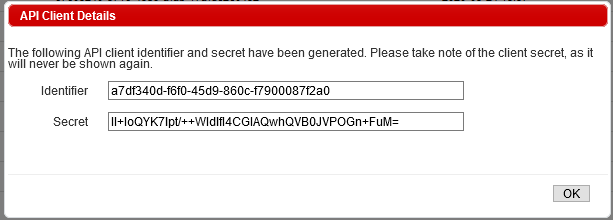
- A popup window will apear with the generated client identification and client secret. Take note of the client secret, as it is the only time when the secret part of the credential will be shown!
Info
The resulting API client created in this step has no assigned permissions, and, although it can authenticate, it will not be able to perform any API actions. Use the Assigning permissions to API clients section to authorize the client for EPAS API operations.
Assigning permissions to API clients
Assigning permissions for API Clients is done using the Permissions action corresponding to each client identifier, in the API client listing page at System » EPAS Users » API Clients page. EPAS API uses JWT token scopes in order to bundle the assigned permissions after authentication.
The following table presents a list of permissions or scopes to be assigned to API clients:
| Permission/Scope | Description | Available since |
|---|---|---|
system:oauth |
Allows management (add, modify, revoke, manage permissions) of API clients | 1.0.37 |
system |
Allows all actions permitted by any other system scopes |
1.0.37 |
targets:view |
Allows listing, viewing of target system information and metadata | 1.0.37 |
targets:add |
Allows adding of target systems | 1.0.37 |
targets:edit |
Allows editing of target system information | 1.0.37 |
targets:delete |
Allows deletion of target systems | 1.0.37 |
targets:retrieve |
Allows the API client to use the Retrieve data operation, as well as inspect the logs corresponding to this operation. | 1.0.37 |
targets:conntest |
Allows the usage of the Connection Test utility for connectivity checking (ping, TCP/UDP port check) | 1.0.37 |
targets |
Allows all actions permitted by any other targets scopes |
1.0.37 |
reports:exec |
Allows report listing and the viewing of report metadata (corresponding to the executive summary), for all report types (Standard, Reuse, Aggregate). For Standard reports, allows the viewing of historic comparisons metadata | 1.0.37 |
reports:data |
Allows report listing and access to report data (recovered accounts, both in CSV and JSON format), for all report types (Standard, Reuse, Aggregate). For Standard reports, allows the viewing of historic comparisons data (accounts) | 1.0.37 |
reports:assign |
Allows re-/assignment of reports to reporting groups, for all report types (Standard, Reuse, Aggregate) | 1.0.37 |
reports:delete |
Allows removal of reports, for all report types (Standard, Reuse, Aggregate) | 1.0.37 |
reports |
Allows all actions permitted by any other reports scopes |
1.0.37 |
Authenticating using an API client
In order to use the API endpoints, a valid Bearer JWT token is required. In order to obtain the token, use the /v3/api/access_token endpoint, the POST action. The following parameters must be present:
| Parameter name | Description |
|---|---|
grant_type |
Static value, always client_credentials |
client_id |
Enter here the client identification |
client_secret |
Enter here the client secret, obtain from the Creating API clients section. |
After the request is done, if the authentication was succesful, the server will reply with a valid JWT token in the response body, in JSON format. An example request/response using the curl command line utility is presented below.
Request:
curl -X POST "http://epas1.detack.de/v3/api/access_token"\
 -H "Content-Type: application/x-www-form-urlencoded" \
 -H "Accept: 1.0" \
 --data-urlencode "grant_type=client_credentials" \
 --data-urlencode "client_id=50e4dbdb-47f2-4122-ad37-b9fba4858e90" \
 --data-urlencode "client_secret=yoOU/6gbC9nUafgSMJeLXlhJrOOc3G1nNd+wJw5yRws="
Response:
{
    "token_type":"Bearer",
    "expires_in":3600,
    "access_token":"eyJ...........<JWT SIGNATURE AND CONTENTS>...."
}
Info
All Bearer JWT tokens are generated with a duration of 1 hour. If more than 1 hour has passed since authentication, the ticket expires. As the client credentials OAuth2 flow does not make use of refresh tokens, the application interacting with the EPAS API is required to handle any further reauthentication upon token expiration. Revoking an API client will not result in the revocation of any existing access tokens, as these are stateless; assume a maximum delay of 1 hour until the particular API client is guaranteed to be revoked; alternatively, regenerate the OAuth2 seeds in the Maintenance Tasks section.
API access and documentation
Use the JWT token generated in the Authenticating using an API client section to access the EPAS API functions. Send the JWT token as an Authorization: Bearer HTTP header value. For additional information and documentation about the API endpoints, parameters, and other metadata, use the bundled Swagger Definition available on every EPAS MASTER, on the management interface, under the /v3/swagger/index.html location.
Info
EPAS API support requests should use the standard command line client curl or raw HTTP requests and responses. For any support related to particular implementations or programming languages (Java, Python, C#) and EPAS API integration, please contact the vendor commercial department for a formal offer.