External Authentication
Authenticators
EPAS allows users to authenticate using third-party mechanisms:
To access the configuration of the external authentication provider, navigate to the System menu, the Users page, and further to the External Authentication tab. The next sections describe the parametrization of each authenticator type.
LDAP and Windows (LDAP)
The following parameters are present:
- Encryption: select the encryption method for connections to the LDAP server, None for no encryption, Implicit TLS for implicit encryption (e.g. SSL on port
636), or TLS for protocol negotiated encryption (e.g. TLS on port389). - IP address / hostname: enter the IP address or hostname (if using TLS/SSL) of the LDAP server.
- Port number: enter the port number on which the LDAP server is listening.
- TLS CA Validation: if enabled, EPAS will use the certificates defined in the SSL Settings page to validate the encrypted connection to the LDAP server. If unchecked, EPAS will cache the first certificate fingerprint returned by the LDAP server. It is recommended, for security purposes, to enable this option.
- (Windows LDAP) Domain Name: enter the NetBIOS or fully qualified domain name for authentication. EPAS will attempt to authenticate the users using the
username@DOMAIN_NAMEformat.
Use the Save button to save the external authentication settings.
RADIUS
The following parameters are required:
- IP address / hostname: enter the IP address or hostname of the RADIUS server.
- Port number: enter the port number on which the RADIUS server is listening (e.g.
1812). - RADIUS Secret: enter the secret used for communicating with the RADIUS server. After the initial save, the secret is stored internally in the EPAS database, and can only be changed.
Use the Save button to save the external authentication settings.
OpenID Connect (OIDC)
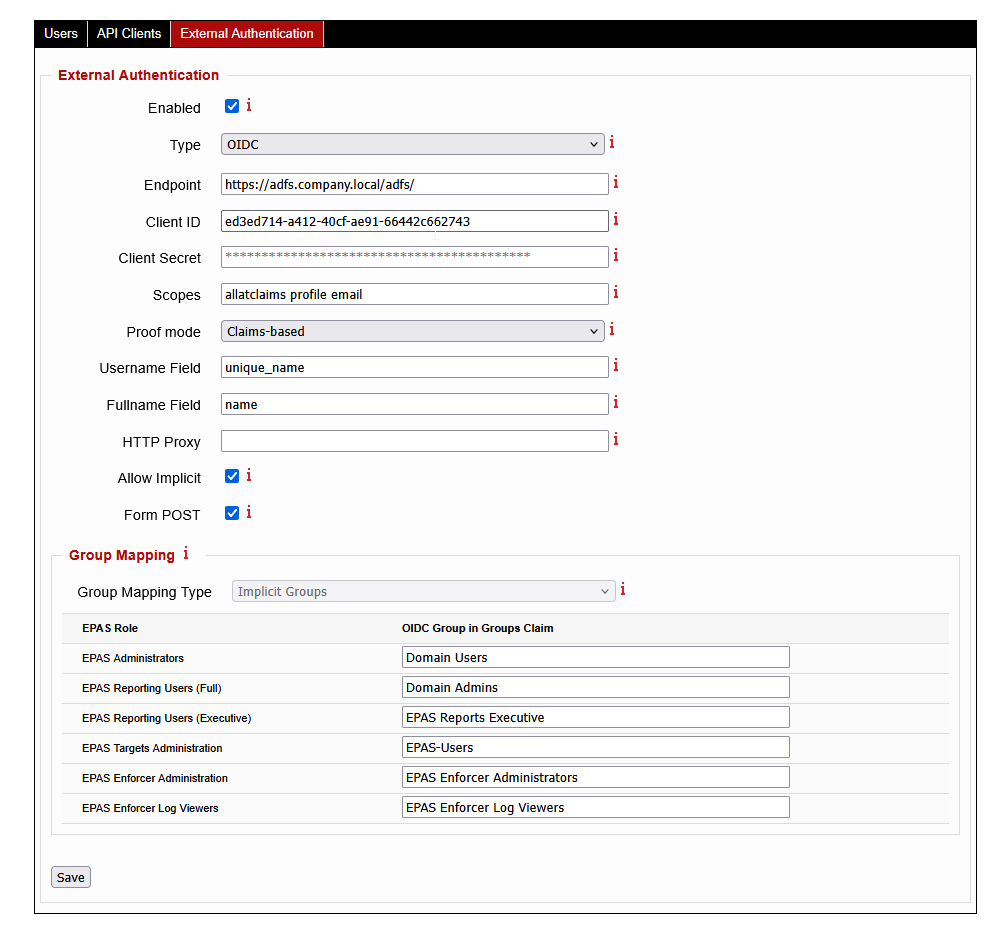
Starting with EPAS version 1.0.42, OpenID Connect authentication is supported. This allows users to be externally authenticated without being defined in the EPAS user list, and also permits more flexible authentication policies such as MFA or conditional access.
The following parameters are present:
- Endpoint: enter the endpoint (or base URL) of the OIDC server. EPAS uses this URL to discover all other endpoints (token, authorization, user information and others).
- Client ID: enter the client identification string.
- Client Secret: enter the client secret corresponding to the the client identification string. After the initial save, the secret is stored internally in the EPAS database, and can only be changed.
- Scopes: enter a space separated list of OpenID scopes that the client browser should request (e.g.
allatclaimsfor ADFS,profile,email). EPAS automatically requests theopenidscope, so there is no need to enter it. - Proof mode: select how EPAS retrieves the data from the OIDC server. Use Claims-based for systems that include the authentication and authorization data in the token, or use the UserInfo setting for systems that include authentication and authorization data in a separate API call to the
UserInfoendpoint. - Username Field: enter the field which contains the username of the incoming user (e.g.
unique_id). - Fullname Field: enter the field which contains the full name of the user (e.g.
name). - HTTP Proxy: optionally, enter a valid HTTP proxy definition. The proxy is used for EPAS to be able to communicate with the OIDC server to validate the user code. Format:
http://PROXY_HOSTNAME:8080. - Allow Implicit: enable this option if implicit authorization is required. In general, this option is only used for communicating with non-standards compliant OIDC implementations, such as ADFS.
- Form POST: enable this option to enable
form_dataresponse mode. In general, this option is only used for communicating with non-standard OIDC implementations, such as Azure services. - Group Mapping: for each of the EPAS roles, enter the value of the group provided by the OIDC server for mapping (in the
groupsclaim). A value is required for each EPAS role. If there are no mappings in OIDC for all the groups, it is recommended to use random strings for the OIDC Group in Groups Claim column.
Use the Save button to save the external authentication settings.
Info
For OIDC external authentication, the EPAS MASTER system must be able to communicate with the OIDC system specified in the Endpoint value. If direct communication is not possible, the use of HTTP Proxy is recommended.
-
This external authenticator requires the users to already be defined in the EPAS system, and marked as Externally Authenticated, under the System » Users page. ↩↩↩
-
This external authenticator does not require the users to be defined in the EPAS system. The EPAS trusts the username and group membership provided by the authentication server, by validating the cryptographic signature of the authenticator. ↩