Web Service Settings
Several configuration options are available for the EPAS administrator, in order to allow flexible web service configuration. EPAS provides an additional layer of security by implementing an IP access list, only allowing specific IP addresses or network ranges to connect to it. Moreover, EPAS offers web services on both HTTP and HTTPS protocols, with the possibility to disable either one and to change the default port allocation for the web service. In order to modify the default web service settings, access the Web Service Settings option from the System menu.
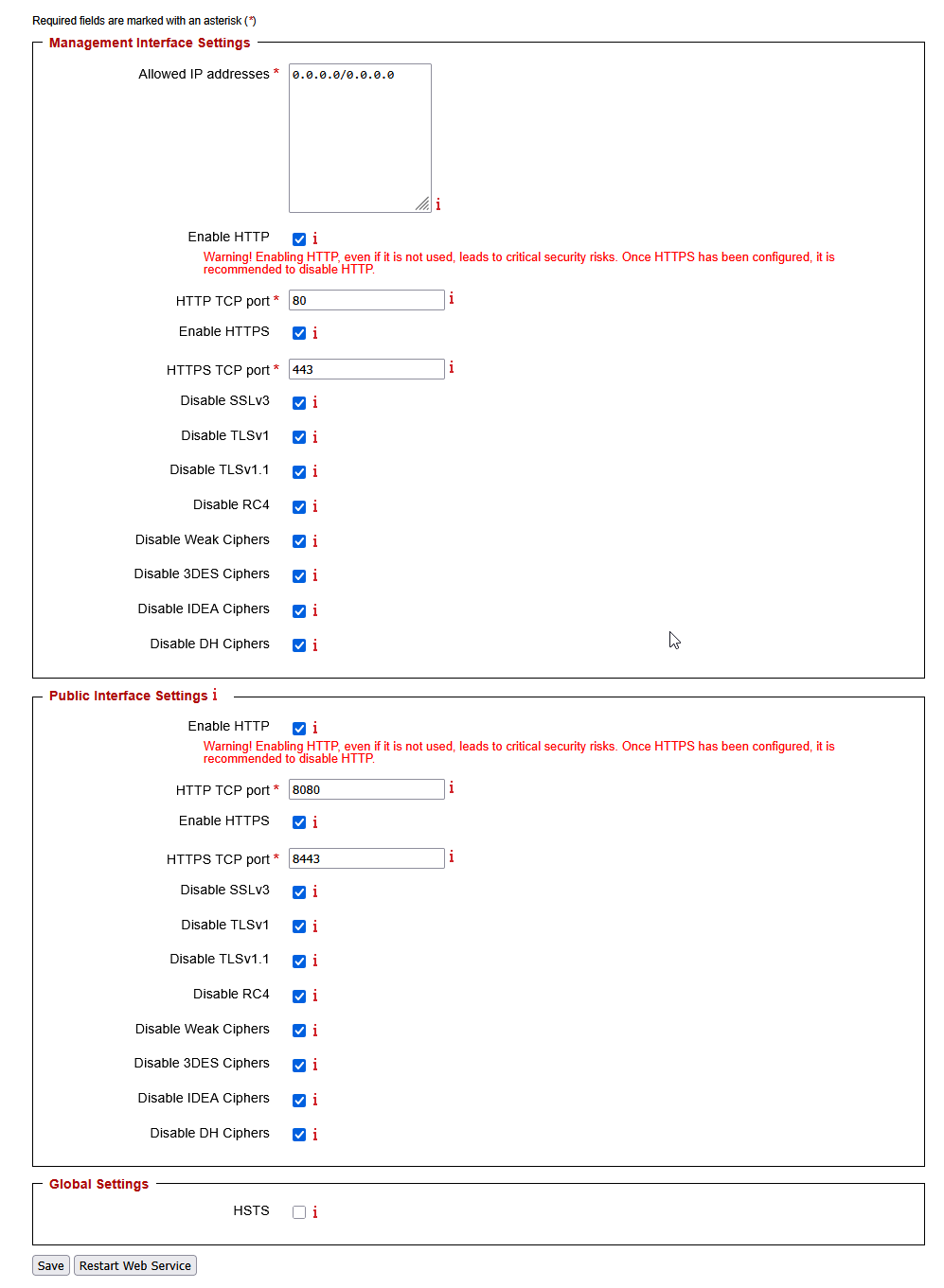
- The Allowed IP addresses field accepts both standard IP address notation (
1.2.3.4), network segments specified by the network mask (1.2.3.4/255.255.255.0) and network segments specified by the CIDR notation (1.2.3.4/24). Enter any IP address / range allowed to connect to EPAS in this field. - HTTP and HTTPS can be enabled and disabled at any time. It is mandatory that at least one communication protocol is available at any given time. It is strongly recommended to use HTTPS as the only available protocol, in order to provide protection against man-in-the-middle attacks.
- The default HTTP and / or HTTPS ports can be changed at any given time.
- The Public Interface Settings section defines the status of the public password quality analysis page. The public interface is by default disabled. It is strongly recommended to only use the secure communication channel (HTTPS), if the public interface is enabled.
- For all SSL/TLS enabled configurations (HTTPS), it is possible to disable weaker protocols or to enable security features, as described in the table below:
| Setting name | Description |
|---|---|
| Disable SSLv3 | Disables the negotiation using the SSLv3 protocol. |
| Disable TLSv1 | Disables the negotiation using the TLSv1.0 protocol. |
| Disable TLSv1.1 | Disables the negotiation using the TLSv1.1 protocol. |
| Disable RC4 | Disables the RC4 ciphers in all enabled protocols |
| Disable Weak Ciphers | Disables weak SSL ciphers, with key strength lower or equal to 64 bits. |
| Disable 3DES Ciphers | Disables the 3DES ciphers in all enabled protocols. |
| Disable IDEA Ciphers | Disables the IDEA ciphers in all enabled protocols. |
| Disable DH Ciphers | Disables the Diffie-Hellman ciphers in all enabled protocols. |
| HSTS | Global switch which enables HTTP Strict Transport Security for all HTTPS connections. Note: It is possible to lock a browser out of EPAS access, if HTTPS is disabled after setting this flag. |
- By default, EPAS supports
SSLv3,TLSv1,TLSv1.1andTLSv1.2, with all cipher suites enabled. - Once the changes have been saved, the web service will apply the settings when it is restarted. A web service restart event can be triggered from the same web page.
Note
If an EPAS administrator accidentally locks himself out of the web service, the allowed IP address list can be cleared from the serial console, by selecting option number 4. This operation should only be performed if the EPAS web interface is no longer reachable from any IP addresses.