Hardware Configuration
After the physical installation and power-on of the EPAS units, network configuration can be done via a serial console cable or via the administrative web interface.
In order to configure networking information via the serial console cable, any serial communication program can be used. The serial communication software should be configured to connect at 115200 bps, 8 data bits, no parity bit and one stop bit (115200/8N1). Connect the serial cable to the Serial Configuration Port, which can be identified in the hardware overview.
EPAS MASTER
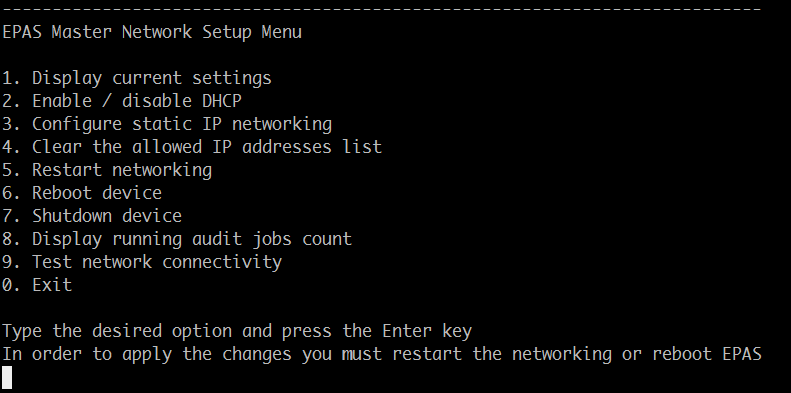
DHCP can be enabled / disabled by toggling its state using the second option (2) and restarting the network service (option 5).
In order to configure static IP address configuration, the third option (3) must be selected.
- Enter the IP address allocated to the EPAS Master system (e.g.
10.222.224.26) - Enter the IP network mask of the network segment (e.g.
255.255.255.0) - Enter the IP address of the gateway (e.g.
10.222.224.1) - Once the settings are saved, restart the network service by selecting option number 5
EPAS AGENT
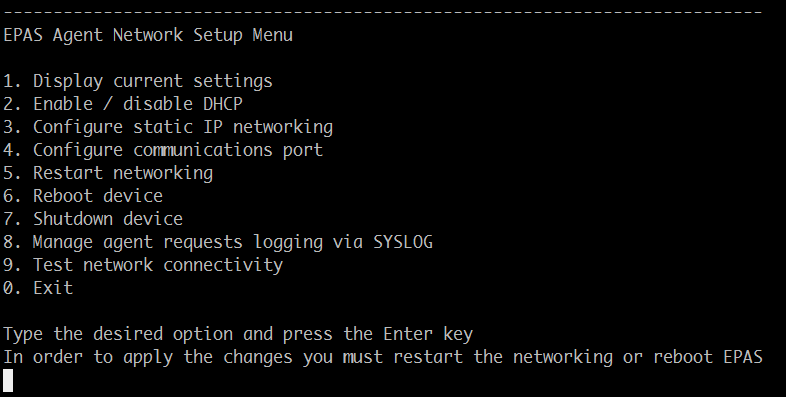
DHCP can be enabled / disabled by toggling its state using the second option (2) and restarting the network service (option 5).
In order to configure static IP address configuration, the third option (3) must be selected.
- Enter the IP address allocated to the EPAS AGENT system (e.g.
10.222.100.35) - Enter the IP network mask of the network segment (e.g.
255.255.255.0) - Enter the IP address of the gateway (e.g.
10.222.100.35) - Once the settings are saved, restart the network service by selecting option number 5.
To verify that the correct configuration has been applied on the EPAS Agent, check the current network configuration by selecting the first option (1). The displayed configuration details should match the desired network configuration for the system.
When the above configuration is performed and the settings reflect the correct network settings for the EPAS AGENT system, the aforementioned device can be added on the EPAS MASTER, as described in the Maintenance » EPAS Systems section.