Server Groups
Info
The actions or operations described in this section are performed once, for each distinct server group (e.g. domain).
Summary
This section contains configuration details and tasks about the Enforcer server groups object types. The server group object type is a virtual object which directly maps to one of the following:
- An entire Microsoft Active Directory domain
- A group of Microsoft Windows workstations or servers
- A group of Linux servers sharing the same authentication structure
- A group of NetIQ SSPR installations sharing the same authentication structure
A server group is the top-most collection of parameters in the Enforcer deployment. It contains multiple other object types or mappings:
- Policy Assignment: links which map a single password policy to one or more groups or user containers
- Servers: one or more servers which share the same authentication structure and are using Enforcer for password changes (in Active Directory, this corresponds to domain controllers)
- Import: utility function which allows the import of the existing group structure from an already defined EPAS target system.
Adding a server group
The first step of enrolling a new domain (or equivalent for other system types) into Enforcer is the creation and base configuration of a server group. This is done by navigating to the Enforcer » Server Groups and using the New Server Group action.
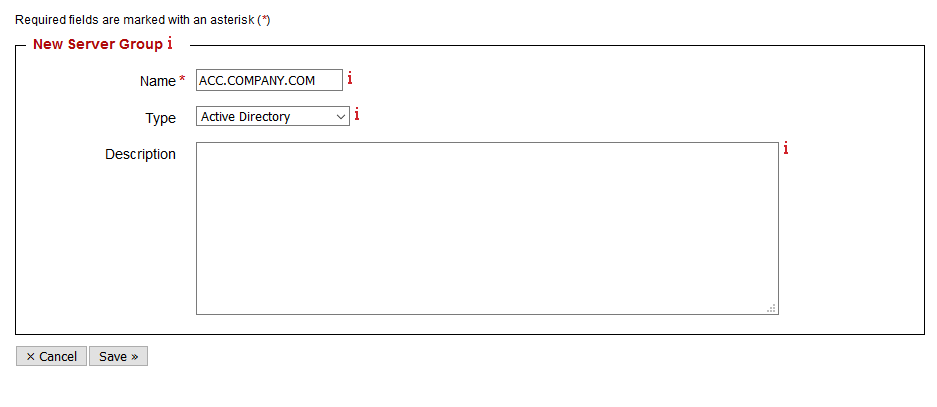
The parameters for the step are represented in the table below:
| Parameter | Type | Description |
|---|---|---|
| Name | required | A name for the server group. It is recommended to use the domain name |
| Type | required | The type of server group. Most commonly deployed Enforcer installations use Active Directory. Other supported options are Windows Local Accounts – servers or workstations, Linux/LDAP systems or NetIQ Self-Service Password Reset installations[^1] |
| Description | optional | A description of the server group. Can contain up to 1024 characters and is used for documentation purposes |
Server group configuration (Generic)
After a successful creation of a valid server group, use the Configure action in the listing table.

This section contains the generic, common parameters of every server group, in the Enforcer section. Depending on the system type, other parameters might become available based on the integration level and the capabilities of the supported system type. For system-specific server group parametrization, see the following sections: - Server group configuration (Active Directory/Windows Local) - Server group configuration (NetIQ SSPR) - Server group configuration (Linux)
The common parameters for the server group configuration are represented in the table below:
| Parameter | Description | Default | Type |
|---|---|---|---|
| Notification language | Select here the default notification language, in respects to verbose user notification, for all the users that do not specifically match a policy. Supported values: English, French, German |
English | Dynamic 1 |
| User privacy | When checked, does not include the username in the password change request logs present in Enforcer » Logs section. Enable whenever compliance regulations require non-identifying data logging. |
Disabled | Dynamic 1 |
| Default policy | This parameter defines the Enforcer password policy (Enforcer » Policies) which applies to any user accounts which are not matched by existing Policy Assignments | None | Dynamic 1 |
Tip
It is recommended to use a Default policy of None during initial deployment. This ensures that besides the user groups and policies specified explicitly in the Policy Assignment area, all the other user accounts on the target system(s) will not be affected by the Enforcer configuration.
Server group configuration (Active Directory/Windows Local)
The parameters for the server group configuration, for the Active Directory or Windows Local Accounts system types, are represented in the table below:
| Parameter | Description | Default | Type |
|---|---|---|---|
| Default action | Defines the behavior of any systems enrolled in Enforcer, when all the EPAS Enforcer components (MASTER, AGENT) are unavailable. Available options: Accept: the system will accept any password change whenever all MASTER/AGENT systems are unreachable. Recommended for environments where an additional password policy is enforced by the system (e.g. default password policy GPO for Active Directory exists) Reject: the system will reject all password changes while communication with MASTER or AGENT systems is not working. Recommended for environments where there is no other password policy besides the ones provided by Enforcer |
Accept | Dynamic 1 |
| Include administrative change | When checked, does not allow administrative or privileged accounts to change user passwords to values which are not Enforcer policy compliant. When unchecked, allows administrative users to set any password for users (e.g. using the Active Directory Users and Computers snap-in) Recommended value for productive environments: Enabled |
Disabled | Dynamic 1 |
| Windows Event Log | When checked, also logs failed password change attempts to the Event Log of the enrolled system. Recommended value for productive environments: Enabled |
Enabled | Dynamic 1 |
| Verbose user notification | When checked, enables verbose user notification on client machines, by using the appropriate provider (credential provider for Windows workstations, authentication modules for other system types). Recommended value for productive environments: Enabled |
Disabled | Static 2 |
| A/D Notification Attribute | Only applicable to Active Directory or Windows Enforcer deployments, where verbose user notification is enabled. Specifies the A/D schema attribute where the failed password change reason is stored, for every user, within an Active Directory environment Recommended value for productive environments: epasEnforcerMsg, or any other schema attribute capable of storing text information. Additional information is provided in Extending Active Directory Schema |
info | Static 2 |
| Domain, Username, Password | These parameters hold the value for the domain name, username and password of the user performing the enrollment procedure. The enrollment procedure for Active Directory installs a password filter on all the domain controllers of a particular domain. For Active Directory or Windows Local Accounts Enforcer deployments, this account needs to be an administrator. |
Blank | Dynamic 1 |
| Intercept NetValidatePasswordPolicy | Only applicable to Windows Local Accounts deployments. This checkbox specifies whether other applications that use the NetValidatePasswordPolicy should have their passwords checked against the Default policy. Enable this to enforce passwords on Microsoft SQL Servers. | Disabled | Static* 3 |
Info
In order to validate NetValidatePasswordPolicy API passwords in Microsoft SQL Server, it is required for the user profile to have the CHECK_POLICY flag set to on. See the SQL server password policy Microsoft article for additional details on how to perform this.
Server group configuration (NetIQ SSPR)
The parameters for the server group configuration, for the NetIQ SSPR system type, are represented in the table below:
| Parameter | Description | Default | Type |
|---|---|---|---|
| Verbose user notification | When checked, enables verbose user notification on client machines, by using the appropriate provider (credential provider for Windows workstations, authentication modules for other system types). Recommended value for productive environments: Enabled |
Disabled | Dynamic 1 |
| Auto-language switch | When checked, allows the EPAS Enforcer to determine the user language from the SSPR password check request, and, if supported, to automatically display the verbose user notification reasons in the appropriate language. If this option is enabled, the Notification language parametrization is only used when the requested language is not supported in the EPAS Enforcer product. Recommended value for productive environments: Enabled |
Disabled | Dynamic 1 |
Server group configuration (Linux)
The parameters for the server group configuration, for the Linux system type, are represented in the table below:
| Parameter | Description | Default | Type |
|---|---|---|---|
| Verbose user notification | When checked, enables verbose user notification on client machines, by using the appropriate provider (credential provider for Windows workstations, authentication modules for other system types). Recommended value for productive environments: Enabled |
Disabled | Dynamic 1 |
| Auto-language switch | When checked, allows the EPAS Enforcer to determine the user language from the Linux password change request, and, if supported, to automatically display the verbose user notification reasons in the appropriate language. If this option is enabled, the Notification language parametrization is only used when the requested language is not supported in the EPAS Enforcer product. Recommended value for productive environments: Enabled |
Disabled | Dynamic 1 |
| Username, Password or Username, Private key | These parameters hold the value for username and password of the user performing the enrollment procedure. The enrollment procedure for Linux installs a PAM module on all the servers in a server group. For Linux Enforcer deployments, this account needs to be an administrator, or have sudo access, as described in the Optional: SUDO Access section. |
Blank | Dynamic 1 |
-
Dynamic parameters can be changed after any system is provisioned and running the Enforcer component(s), and take effect on the next password change. ↩↩↩↩↩↩↩↩↩↩↩↩
-
Static parameters can no longer be changed after the system has been provisioned. ↩↩
-
This static parameter can be changed while the system is provisioned. But requires a full reprovisioning (deprovision, restart, provision, restart) process to take effect. ↩