Backup & Restore
EPAS provides several backup features to allow the creation, scheduling, upload and restore operations for EPAS backups. Use the backup feature for creating snapshots of the EPAS configuration data and settings, as well as any cached information. The backup content is fully encrypted.
Multiple backup types are possible with EPAS:
- Full (Offline): this backup type is a complete backup of the EPAS configuration and data and can be used to restore data across hardware migrations, on different EPAS versions (e.g. restore backup from 1.0.37 in 1.0.38 installation). This backup type requires the EPAS management interface (and therefore active jobs, schedules, target retrieval operations) to be offline. This backup type cannot be scheduled at regular intervals, and cannot be pushed/transferred via the network. Manual operation is always required.
- Full (Online): this backup type is a complete backup of the EPAS configuration and data and can be used to restore data across hardware migrations, with the restrictions that it must restored on the same EPAS version as it was taken on. This backup type does not require the EPAS management interface to be offline, and therefore can be scheduled at regular intervals. This backup type can be pushed via the network once it takes place.
- Configuration (Online): this backup type is a complete backup of the EPAS configuration and can be used to restore configuration data across hardware migrations, with the restrictions that it must be restored on the same EPAS version as it was taken on. This backup type does not require the EPAS management interface to be offline, and therefore can be scheduled at regular intervals. This backup type can be pushed via the network once it takes place.
Backup Scheduling
The backup functionality implements the standard scheduling functionality present in other areas of the EPAS management console, such as audit jobs, aggregate queries and password reuse queries. Two methods of scheduling are available:
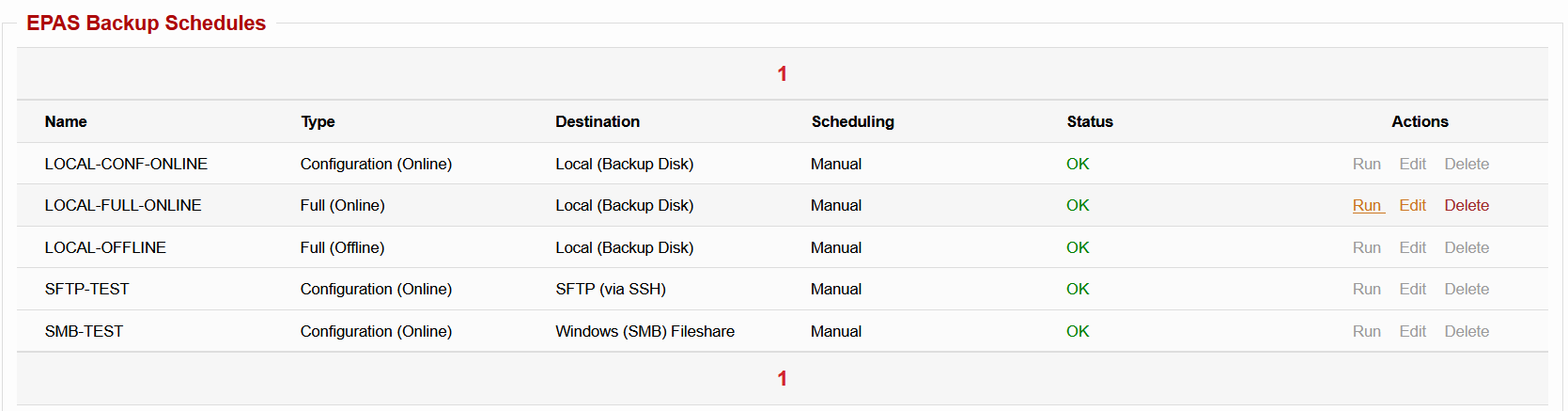
- Manual: this method requires the EPAS operator to trigger the backup operation manually, from the EPAS management console. This backup method is the only available method for backups of type Full (Offline).
- Scheduled: this method is fully automated, and once set-up, it will automatically perform the backup operation (and optionally, push the backup to a remote site) on a scheduled interval.
Tip
It is recommended to have a Full (Offline) backup schedule defined using the standard options (Exportable, Manual, Local). Use the Run action on this backup schedule every time performing EPAS software updates, or before a hardware migration.
Exportable
Check the Exportable box in order to make the backup exportable. Exportable backups can also be decrypted by Detack GmbH in order to restore them to new hardware, in case the EPAS master unit hardware fails. Non-exportable backups can be restored only to this hardware. If a non-exportable backup is created and this EPAS unit hardware fails, then the backup data will be permanently lost.
Tip
It is recommended to always have an Exportable restore point whenever performing hardware migration operations, as well as during EPAS update operations. Restore points without an Exportable flag can only be used on the same EPAS system they were created on.
Remote Backups
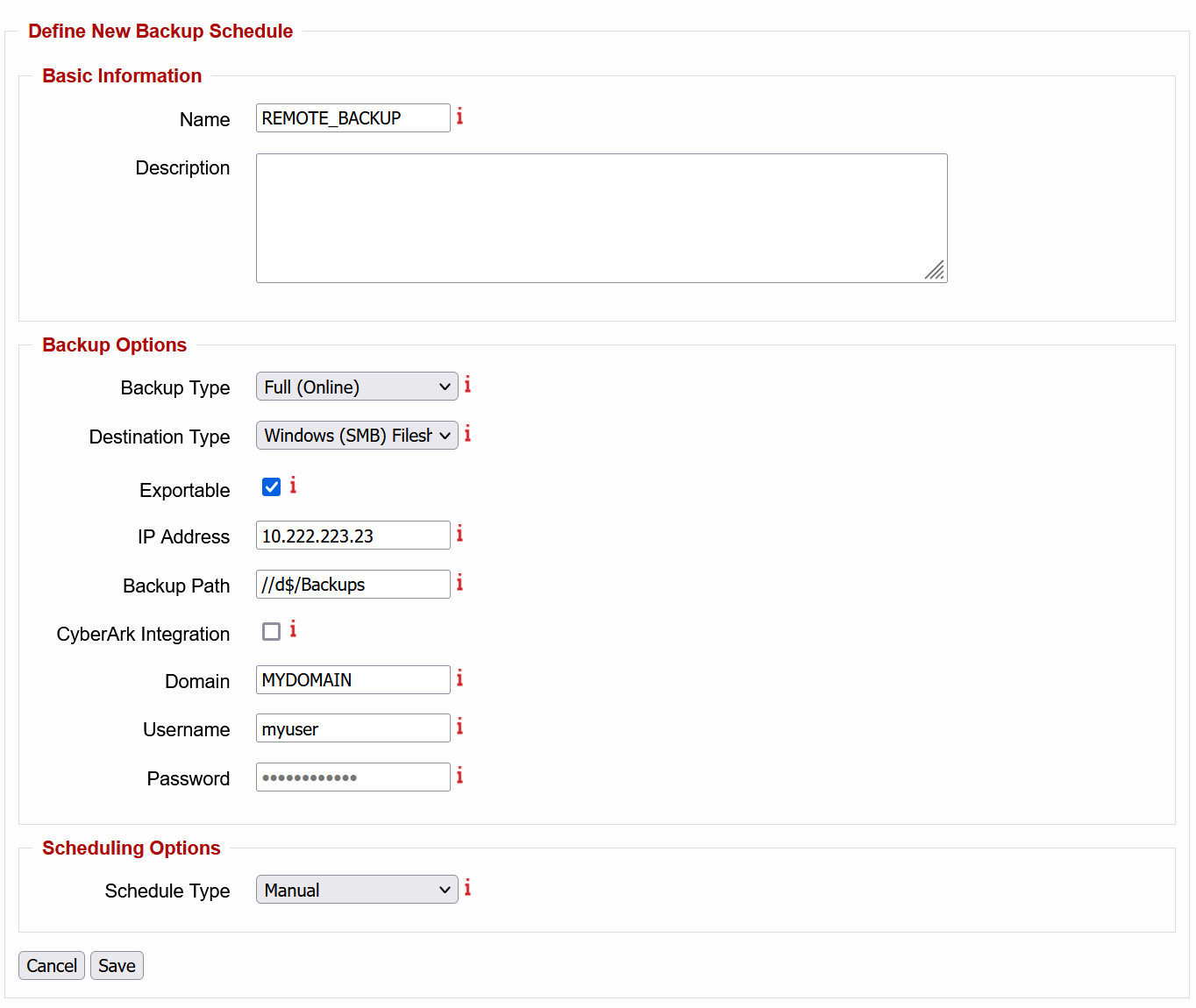
The Full (Online) and Configuration (Online) backup types allow restore points (snapshots) to be pushed/transferred to remote locations, upon backup operation completion. Currently, EPAS supports three remote backup destinations:
- Windows (SMB) Fileshare: this backup destination allows the backup contents to be transferred to the Backup Path provided by the EPAS operator. The credentials can be stored in the backup schedule configuration or can be retrieved from a secure vault using a CyberArk operation.
- SFTP (via SSH): this backup destination allows the backup contents to be transferred to the Backup Path provided by the EPAS operator, using the SSH protocol. Use this backup destination for storing backups in UNIX environments.
- SCP (via SSH): this backup destination allows the backup contents to be transferred to the Backup Path provided by the EPAS operator, using the SSH protocol. Use this backup destination for storing backups in UNIX environments, when SFTP is not available.
- Disaster Recovery (to another EPAS MASTER): this backup destination allows the backup contents to be transferred to another EPAS MASTER instance. The receiving system will have the restore points present in the list of restore snapshots. Enter the Serial Number of the unit receiving the backup.
Info
If any of the backup schedules, during their scheduled run time, fails to transfer the restore point to the remote destination, a Local Backup will be created instead. The results (failure) of the last scheduled run is available (Last log) by clicking on the backup schedule in the table listing.
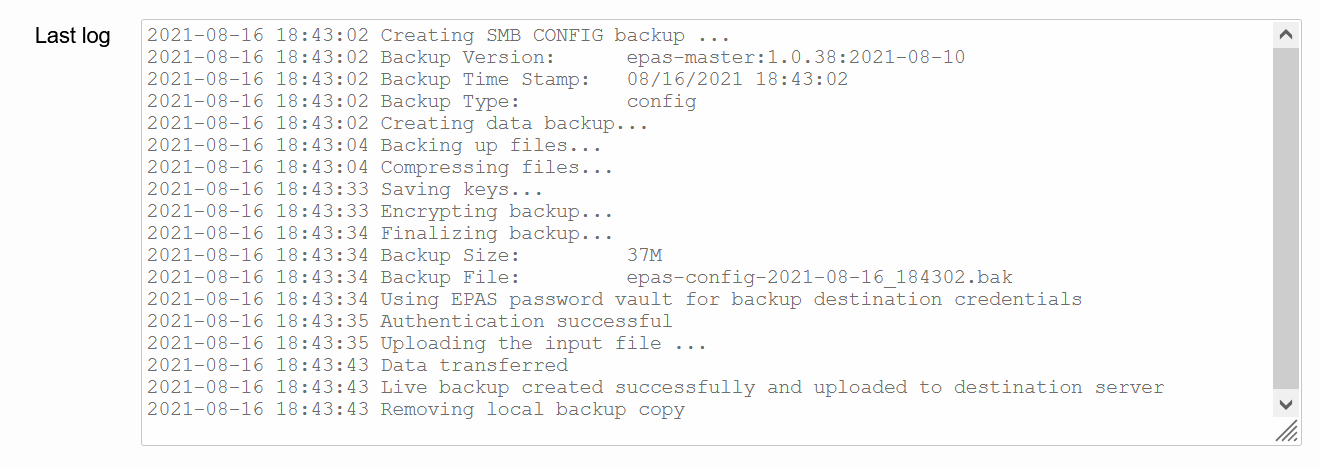
Local Backups

All backup types allow restore points (snapshots) to be stored locally, on the EPAS MASTER backup disk. The backup destination in this case is Local. No other options (besides generic backup options and scheduling) are available for this backup destination.
Info
During the backup creation for the Full (Offline) backup type, the EPAS MASTER system will not be available and no audit jobs will be executed. The backup function can be called only when no jobs are in the running or queued phases and no data retrieval is performed. The backup is expected to take up to one hour.
Performing a backup operation
To perform a backup operation, use the scheduled facility to automatically create the restore point(s) at the requested interval. Alternatively, for backup schedules with Manual execution, use the Run action in the table to start the backup operation.
Restore Points
Restore points represent the available snapshots which are further used to restore an EPAS instance to a particular configuration (and/or data) state. The listing of the restore points is available under the same page as the backup operations, under the System » Maintenance » Backup & Restore page.
Use the EPAS Restore Points section for identifying potential backups for restoring EPAS configuration, data and settings, as well as any cached information from a previously created backup. The restore operation will completely overwrite the current data; if in doubt, first back up the EPAS system. During the restore operation, the EPAS system will not be available and no audit jobs will be executed. The restore function can be called only when no jobs are in the running or queued phases and no data retrieval is performed. The restore operation is expected to take up to one hour.
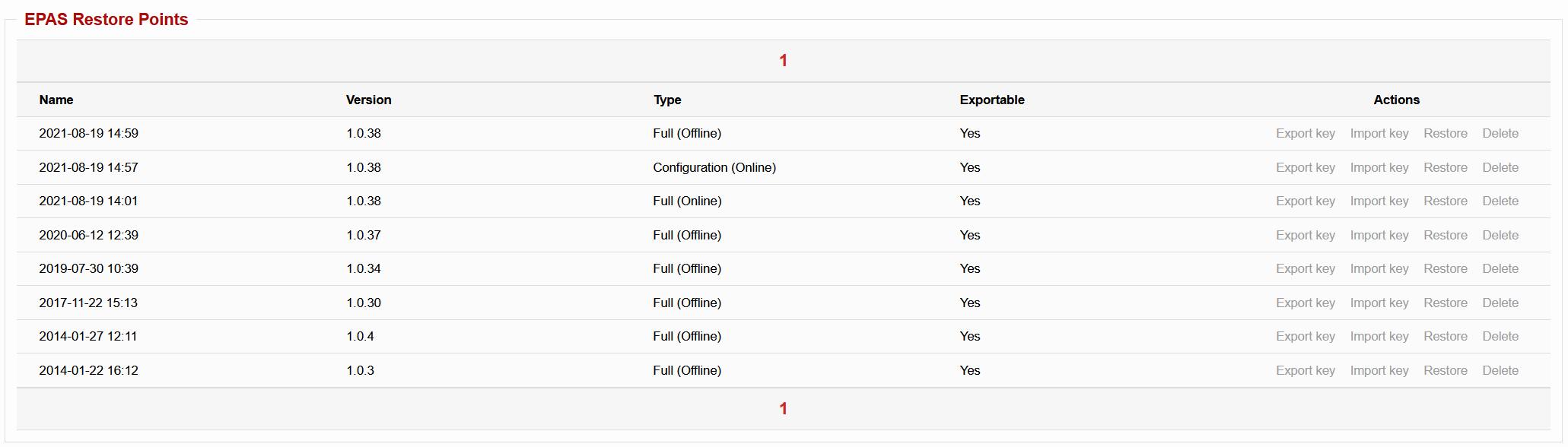
- Click the Restore action to roll back to a previous EPAS snapshot.
- Click the Delete action to remove the backup from the storage facilities.
- Click the Export key action to save a copy of the encrypted key, used for migrating to new hardware appliances.
- Click the Import key action to restore a new encryption key for the backup (provided by Detack GmbH and derived from an existing export key).
Tip
Restore points which are stored on remote locations can be made available in the Restore Points section by using the Upload Manager facility.
Backup/Restore Settings
User-defined Passphrase
All backup operations which are of type Online are encrypted (and optionally transferred to remote locations). The default setting is to encrypt the backups with the EPAS MASTER system key, as well as with an exportable key, if configured.
In high-security environments, an additional option for online backups exists, whenever encrypting the backup file: to also use a user-defined passphrase as an additional factor, whenever encrypting the restore point.
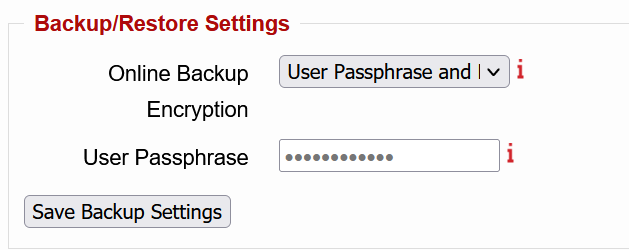
This operation can be performed in the Backup/Restore Settings area of the main backup page. Select the User Passphrase and RSA keys for the Online Backup Encryption dropdown, to change the default encryption method for online backups. In this case, also supply a User Passphrase for the encryption operation.
Warning
Whenever applying restore points, and starting the restore operation, the User Passphrase needs to correspond to the passphrase set when the restore point was created. Failure to remember the passphrase and / or loss of the passphrase makes any restore point with the aforementioned passphrase useless.
Disaster Recovery
Enter a valid EPAS serial number (e.g. ABCD-0123-FEDC-4321) in the S/N for Disaster Recovery field, on any EPAS MASTER which is receiving backups from other MASTER appliances. The receiver will use this serial number whenever an EPAS MASTER backup is received in order to validate whether the sender is an authorized backup system (source).