Password Quality (PQEVA/PQA)
EPAS uses several methods of providing objective password measurements, for each recovered password, in the audit report. The password strength measurement is a value from 0 to 100 assigned for each recovered password; the value of 0 suggests that the password is likely to be recovered by a supercomputer or EPAS in a matter of seconds, while a value of 100 suggest the password is strong, from cryptographic / structural entropy perspective.
EPAS also exposes a public web interface which can be used in order to verify the password policy compliance and the strength level for any given password candidate. Users can voluntarily access this page and verify their new passwords before using them. By default, the public interface is deployed at the same IP / hostname as the EPAS management interface, on a different port (e.g. 8445).
There are three components to the PQEVA public interface, which allow different levels of customization:
- Standard Interface: allows strength measurement and a predefined policy measurement
- Advanced Interface: allows strength measurement and a selection of several password policies
- API endpoint: allows strength measurement and policy measurement, under a JSON / JavaScript interface, for integrating with external services
Standard Interface
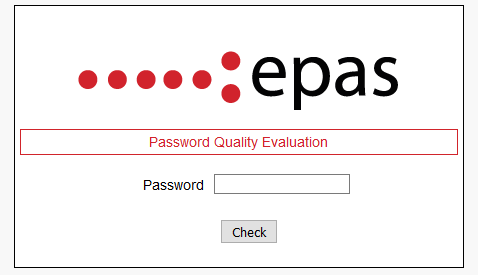
The standard interface, available at the https://epas_ip:8445/ URL provides a single input form where a user can check the strength measurement and policy compliance of a password of its choosing.
This interface is suitable for simple environments, where users are using the same password policy or no password policy. The settings for the strength scoring mechanism and the default policy checked against are available in EPAS under the Audit Jobs → Settings → Password Quality section.
Advanced Interface
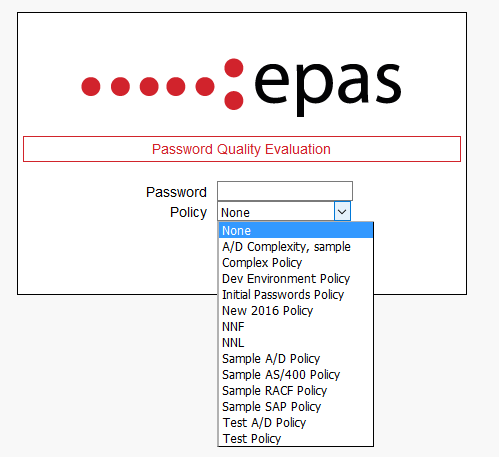
An advanced web-based interface is also available at the https://epas_ip:8445/advanced URL; this interface provides a single input form where a user can check the strength of a password of its choosing. An additional select box is available on the same page, where the user can select the password policy to check the password against.
The password policy list is directly connected with the password policies defined in EPAS, available in the Audit Jobs → Settings → Password Policies section. This interface is aimed at complex environments, where users must obey different password policies, depending on the target system, privilege levels, or department requirements. In the Password Policies section, it is also possible to specify, by editing any existing element, which password policies are hidden from the advanced interface display.
The settings for the strength scoring mechanism are available in EPAS under the Audit Jobs → Settings → Password Quality section. It is also possible to hide password policies from this page, by editing the password policy and setting the Hide in PQA flag.
PQEVA API
A JSON interface is exposed for integration with custom applications (e.g. internal self-service portals). The API endpoints exposed are documented at the https://epas_ip:8445/example.html URL. This interface has all the capabilities of the advanced web interface described in the previous paragraph.
For easier integration with external components, password strength and policy compliance can be evaluated by issuing POST requests to the /json component. The following table details the accepted parameters:
| Parameters | Description |
|---|---|
| password | The password to be evaluated for strength score and policy compliance. |
| policy (optional) |
The policy to be used whenever doing policy compliance checks. Note: Not specifying a policy id will default in using the default password policy defined within the management interface. If no policy compliance checking is required, then this parameter should be set to 0. |
The password policy list can be retrieved by issuing a GET request to the /json/getPolicies component.
Sample JSON API response (/json) - success
{
    "policy_enabled": false,
    "pw_strength": 34
}
Sample JSON API response (/json) - error
{
    "policy_enabled": true,
    "error": true,
    "err_code": "INVALID_POLICY"
}
Sample JSON API response (/json/getPolicies)
{
    "16": "A\/D Complexity, sample",
    "8": "Sample A\/D Policy",
    "10": "Sample AS\/400 Policy",
    "9": "Sample RACF Policy",
    "13": "Sample SAP Policy",
}
Supported Languages
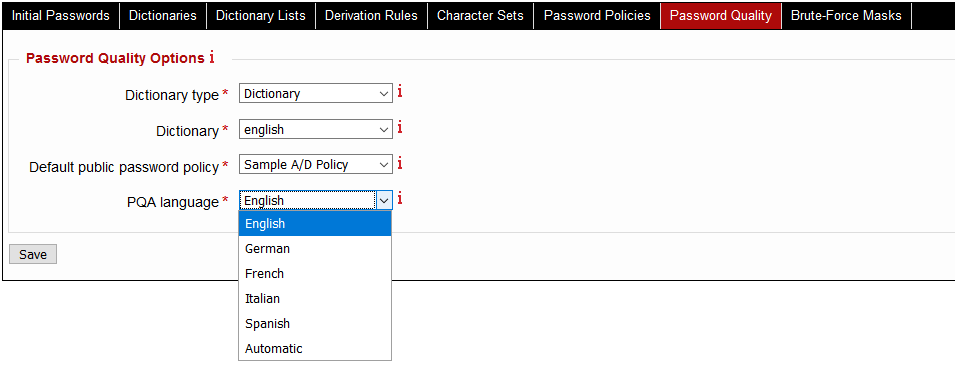
The default display language for both the standard and the advanced interfaces is English. The API endpoint is language-independent. It is also possible to switch the language of the standard and advanced interfaces to any of the following languages:
- English
- German
- French
- Italian
- Spanish
- Automatic
To change the display language for the public interfaces, in the EPAS management interface, navigate to the Audit Jobs → Settings → Password Quality section and select one of the languages from the list:
Note
The Automatic option allows the password quality evaluation page to be displayed in the language sent by the browser, if the language is one of the existing ones present for the evaluation page.